Cari Blog Ini

Diberdayakan oleh Blogger.
Tampilkan postingan dengan label SECURITY-TIPS. Tampilkan semua postingan

how to recover your windows password

buddy i am going to show you how to recover your windows password.

1st step=connect a pendrive/memory card on computer.

2nd step=follow my image instruction


                                                   go to my computer
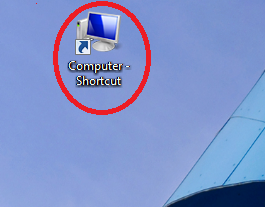
                                               

                             click on open control panel
                                                 

                                                           clck on user account
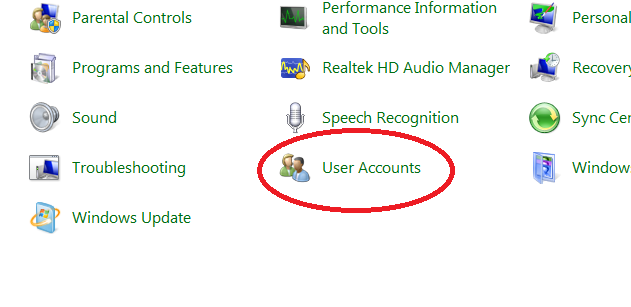
                                       click on crate a password reset disk

                                           here is put your current password
                                                       

wait until finished progres


click finish
 
how to use this tricks and break windows password

 1st step= restart your computer

2nd step= for test put a wrong password

3rd step=connect your memory card or pendrive where you install recovery file

4th step= put you wrong password  and enter.windows says wrong password ..and you can see reset password option.


5th step=after clickin reset option if you are connect your memory card/pendrive then open a new window.

6th step=click next and enter a new password then finish


  if you can understand then you can watch this video


Topic about How To Prevent Access To Drives From Your Computer (only video tutorial)

Drives From Your Computer


Hlw everyone, this is really amazing tutorial and you can also create security in your HardDrive disk after watching this videos..

Avast Free Antivirus 2014 with license key till 1 year


Enter bellow the code: 

C07134846H1200A0616-H318MR3P


Download avast software HERE


You can watch this video :


Hide your Hard Disk drives


HLW GUYS, After long time ago it's the post in a Ramadan. Hope every one can easily understand my post. let's go......

Follow my image instruction:


If you can understand after follow my image instruction then watch this videos or comment us on facebook page....

Norton Internet Security 2014


Hello every one,today my topic is Norton Internet Security 2014.  Many people use this antivirus. It is one of the popular Norton antivirus . Today I will give you this antivirus totally free . This antivirus comes with an Activator.  which allows you to install very easily antivirus full Version .

DOWNLOAD HERE = Norton Internet Security 2014 

DOWNLOAD HERE = Norton Internet Security Activator


How To Keep Safe Your Gmail Account.


How To Keep Safe Your Gmail Account.


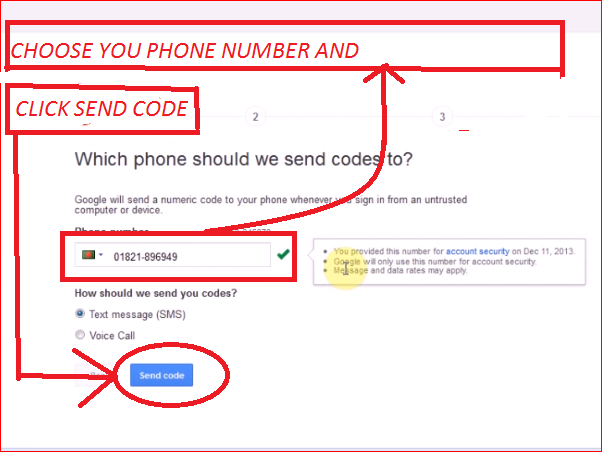
Hi I am going to show you how to keep safe your gmail account by 2-step verification system.Let's go and follow my image instruction
1


1ST STEP= GO TO YOUR GMAIL ACCOUNT. THEN LOGIN YOUR ACCOUNT.........
2-step verification


 2ND STEP= CLICK ACCOUNT OPEN A NEW WINDOW
2

                                                  3RD STEP FOLLOW IMAGE....

3


4

5
6

h


IF you can't understand my image instruction then watch this video..........

Avast Free Antivirus 2014 with license key till 2099

avast  free antivirus 2014
cool down...i have a very good news all avast antivirus ...today's i am going to give you life time key for avast antivirus .follow my step and get 2014 with license key till 2099......


 There are many questions Avast Internet Security Avast free antivirus and what 's the difference ? Thanks , I would differ with . My license key allows you to use until the 2099 if you 're to survive : p. Do not believe ? Please download it from here . After downloading the setup.then
1.Go to Setting Click Registration
2.Click offline registration
3.and click “enter license key” in the right and a pop up windows open with a gaps
4.Enter the code: W1208070R9900D1199-T549MYK0


     another: C6788288R9977A0910-8P92KHP0

5.Click OK enjoy the Antivirus to the year 2099 if you are alive 

if you can understand how to install avast software and activate licence key then you can watch this video
 

With just 1 Mb in 1 portable software and remove the hide any drive (the most simple rules)

Computer tips

http://computer-tipswithtricks.blogspot.com/

If the use of your personal computer, images, documents, files, there is something much more. And they have to hide from everyone lock folder, hide files, is to use the more things. Not so much if the drives (where the secret files kept) hide would have happened if it had been! This again is very simple way without any trouble again.
No being should be more chatter. Click here http://www.mediafire.com/download/yvbh4g8rb49zuzz/drive+hide.exe to download the software soon. Then double-click on the program, you will see all drives showing, then you right-click on the drive you want to hide and click the hide selected drive. A box will appear yes click. Once you restart the pc in diameter with a see to hide did not find it hard to drive?
http://computer-tipswithtricks.blogspot.com/


If you want to drive back down to hide selected drive, click to unhide  selected drive. and restart the PC again. In diameter and where getting back to your drive.

computer tips some useful tips for your compele online security

computer tips


  the goal of every good thing if the neighborhood has seen some of the worst aspects. Just as with Internet viruses, etc.(computer tips) . Though this is the beginning of things, but the latest plan premium over the last few years with the increased use of the Internet against the step, step increases in these activities continues icon sad some tips for you to complete online security include it with the hacking.


     the use of the internet is still largely ignorantabout these. Allowingthem to stay safefrom these is really a big challenge.Among these challengesare the result ofeveryone having sustained, victims of virusattacks and hacking!      
    computer tips
2  Today's, we know some of the tips and will concentrate on trying to understand the course and I hope everyone will use the icon smile full of useful tips for online security . Because you need to stand up to you to challenge. I just cannot do anything faster than a directed icon sad some useful tips for your complete online security. Let 's get down to the ground


   it is expected that following instructions must be 90 % securing icon wink you some tips for you to complete online security

1/ must always use good anti-virus software and update it regularly to try to keep. The PC so it cannot be attacked spears Please install the  Anti spayara .

2/ always known website, blog groups to visit. Before visiting a new website to ask others about it and find out as much as possible in different ways. And of yes, no, or do not understand appreciate click the link or banner must stay away from.

3/ No file / mail etc. When we download on the PC before you can open it and take the scan. If you have any problems with this file, it will be caught. Remember, this is the digital age; the eye is able to damage the small problem that gets much bigger project.

4/ regularly update your operating system and browser. Get better and better quality service, leaving most of the old version to the new version of the Learn to use.

5/ blown in no case did not no nothing anywhere to share your password. Put all the tough kinds of passwords , such tamim ** @ zxcv12300 ** and every 3 months during the course , will change every password security icon big grin some useful tips for your entire online
 
      6/ All the sites or pages linked to the address on the address bar of your browser .

7/   you need to enter your password in order to log in before you can see if there is a link to the https Example.https :/ / mail.google.com. If you must quickly leave the http://