Cari Blog Ini

Diberdayakan oleh Blogger.
Tampilkan postingan dengan label INTERNET. Tampilkan semua postingan

How To Download From Utorrent


Hlw everyone, i am sharing a helpful tutorial about downloading system from utorrent. This is really easy downloading system from utorrent... i hope you can easily download from utorrent after watch this video.......



Bring surrounding the chat options for Facebook,

facebook


Hello everyone, how are you all? Today i am going to show you how to how keep extra facebook chat option in your  browser. So, follow my instruction..

#open your then follow the image bellow
1


2


# paste the url http://www.facebook.com/presence/popout.php in the location box


#ok now time to check our process ..how can it's work follow my image

4


5


FreedomPop's 100% Free Internet: Review and Tips

FreedomPop's 100% Free Internet: Review and Tips
FreedomPop is a company with a mission to deliver free and fast mobile services to all Americans. Wait, did I just say free? Yes, free! …To a point. Let me tell you my experiences of owning one of their mobile 4G hotspots.

FreedomPop offers hotspots (among other devices from their website) that give you free data every month at no additional charge. You only need to purchase one of these hotspots a single time, after which you can simply continue to receive free monthly data. However, it can be difficult trying to gather all of the necessary information from FreedomPop that you need to make an educated purchase. The following is my experience dealing with FreedomPop and suggestions on how to utilize the free options concerning their 4G hotspots.

Plans and Services

With the purchase of a portable hotspot from FreedomPop you get 500MB of free data a month. If you go over this limit, you will be charged. However, if 500MB isn't enough, you can permanently get an additional 50MB of data per a “Freedom Friend” associated with your account--for a maximum of an extra 500MB a month. These “Freedom Friends” can easily be found if you just do a quick google search. Not only do you get free data from having friends, but friends can send or request additional data from each other for free, which is great if it looks like you may run out of data before the end of the month. If you are still running short on data, you can earn even more for the month by completing additional offers like surveys and app downloads through the FreedomPop mobile app.

Now, it should be noted that your unused data does not roll over to each month unless you pay for the “FreedomPop Rollover Service” for $3.99 a month. This brings me to some of the things you need to be aware of.

  • When you set up your account with FreedomPop, they will try to sign you up for trial plans that charge you after one month. If you don’t want to pay, make sure you are only signed up for the “Free 500MB” plan.
  • If you are trying to use FreedomPop for free, you will want to disable “Automatic Top-Up” under billing settings, which is enabled by default. If “Automatic Top-Up” is left enabled it will automatically charge your account $10 if you reach 400MB of usage in a month. However, even with this disabled, you will need to make sure you do not exceed your monthly data allocation to avoid being charged.

The HotSpot

Now as far as the device goes, I managed to pick up a FreedomPop Overdrive during a sale of FreedomPop's for $25. Keep in mind though that they don't have them on sale for this cheap very often. Although I was happy with the price I paid, the shipping time for this product was much longer than expected. It took 22 days from the day I ordered the device to the day it arrived at my doorstep. Shipping times this long are common with FreedomPop products, so if you need your device right now, you may want to look for something else. The device itself was very easy to set up, change the password on, etc. The device does run off the Sprint network, so speeds are good as long as you are in a sufficient Sprint coverage area.

Conclusion

All in all, a FreedomPop hotspot is a fantastic device to keep on hand. However, it is not for the faint hearted. You will need to diligently watch your data usage and set it up properly if you don't want to pay anything extra. While it probably won’t cover all your data usage, it is fairly convenient to keep in your laptop bag, purse, or car as an emergency hotspot if you cannot find a trusted public network. Have any questions or experiences you would like to share? Tell us about them in the comments below.

Tricks: Get instant 20 points from yahoo answering!!! (only video tutorial)

Watch this video!!! Then you can easily make 20 points from yahoo without any trouble.

mozila fire fox shortcut key.(computer tops with tricks)

computer tips with tricks

mozila
 mozila shortcut


If you are using mozila firefox  then this post will help  you  …
Fire fox shortcut :
Arrow=page up and down just type keyboard  key name=”home “  then page ups.
And type keyboard key name=”end “  then last page.

Spacebar=web page keeps down.
Shift + space bar: web page keeps up.
Alt + home= 1st page open.
Ctrl + = zooming page
Ctrl - = zoom out.
Ctrl + h = Browsing ur web history
Ctrl + t=new tab
Ctrl + w= present tab close.
Ctrl +d =book mark page
Ctrl +l =write url
Ctrl+k =search box
F5 present page relod or refresh.


facebook shortcut (computer tips with tricks)


computer tips with tricks


facebook


Facebook shortcut
Shift + alt+1 =fast get ur homepage
Alt+1 =home page
Alt+2= your profile
Alt +3= if u have friend request pending then u can see…but if u don’t have any friend request then it can’t be work.
Alt+4=if you have any message then open.

how to increase your facebook friends


  Hi guys today,i am gonna to show you how to increase your facebook friend .delete old facebook friend request..so follow my image instruction..............

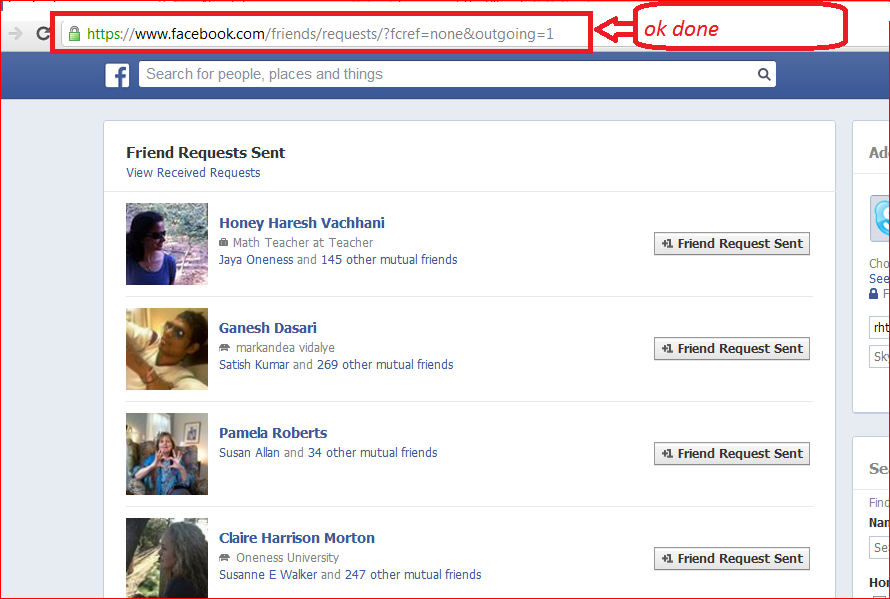




                    click here and cancel all previous friend request

Very easy to download youtube videos audio/mp3 format:


you can easily download youtube videos MP3 format
So we have a video from Youtube, download video format but do not format audio. Many mega bytes audio save you a good opportunities for those who want to download format. Assume whatever tips you know.
First go to this link Click to download youtube videos in mp3 format, you will see this picture shown bellow-


Then mark the red spot in the box and paste the link to your youtube video and then click download.
Then a few second you will verify the link and download will start automatically.  


Fast download youtube videos (only video tutorial)


watch this video the you can easily download youtube videos without any problems...